



Why More Hours Don’t Equal More Output and What Professionals Should Do Instead
Many professionals still equate productivity with visible effort: longer hours, packed calendars, and constant responsiveness. Yet research consistently shows that beyond a certain threshold, working harder actually reduces output.
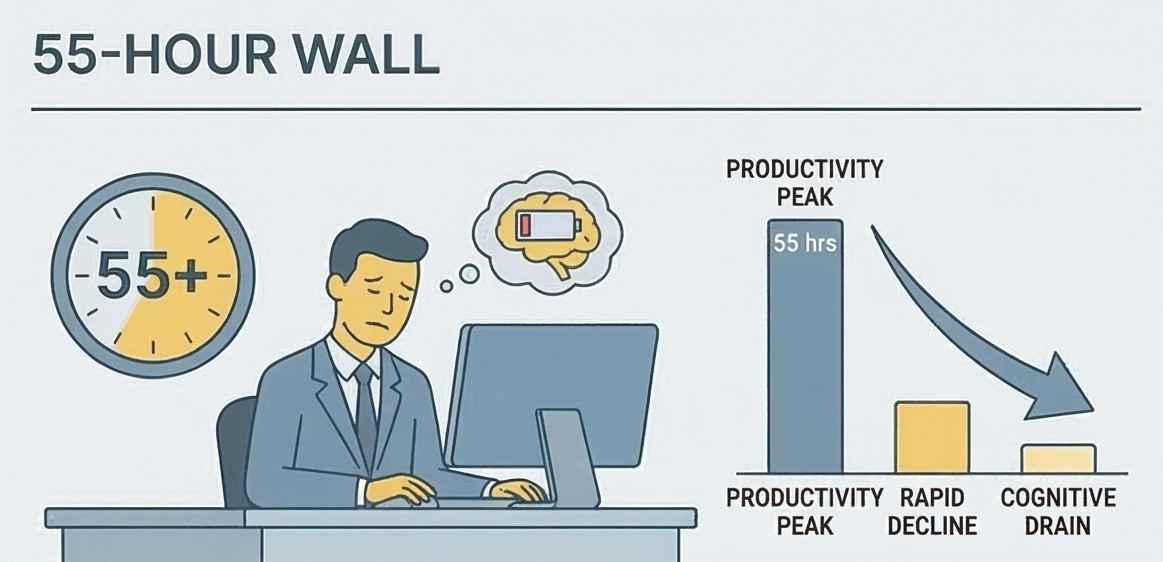
Research by Stanford economist John Pencavel, based on data from industrial labor output, found that productivity per hour drops sharply once a person exceeds 50 hours of work per week. Beyond roughly 55 hours, additional hours contribute almost nothing to total output and may actually erode the quality of earlier work.
The finding is especially relevant for knowledge work, where results depend on cognitive quality rather than physical throughput and where fatigue quickly degrades decision-making, creativity, and analytical accuracy. The problem, then, is not discipline or work ethic. It is how we define productivity in the first place. Many modern workflows still reward visible effort — long hours, constant responsiveness, and full calendars — even when those signals have little connection to meaningful output.
The Hidden Cost of Manual Processing
Consider a task that appears in some form across nearly every industry: processing invoices. While invoice handling may seem mundane, it illustrates a broader pattern that appears across knowledge work: professionals spending large amounts of time executing predictable processes instead of redesigning them.
The traditional workflow looks like this:
- Receive an invoice via email, PDF, or paper.
- Open a spreadsheet.
- Locate the client name, invoice number, amount, and payment date.
- Enter each field manually.
- Repeat — dozens of times.
This process is slow, repetitive, and cognitively draining, even for experienced professionals. More importantly, the time spent performing these steps is time that cannot be invested in analysis, decision-making, or strategic work. Repetitive data entry generates cognitive fatigue, which increases error rates and reduces the mental bandwidth available for higher-value work.
The same pattern plays out across functions and industries:
- Sales teams manually update CRM records after every interaction.
- Marketing teams pull data from four platforms to compile a single weekly report.
- Analysts spend hours reformatting spreadsheets before they can analyze them.
- Researchers read and summarize dozens of documents by hand.
In each case, the bottleneck is not the person’s skill or effort; it is the workflow itself.
ℹ️ Practical takeaway
Audit your recurring tasks. Identify the ones that consume time but require little judgment or creativity. These are prime candidates for redesign.
From Doer to Architect: A Different Way to Think About Work

Doer (Hands-On Execution) ⸺ vs ⸺ Architect (Strategic System Design)
Escaping the productivity trap requires a shift in perspective, not just better tools or techniques. The core difference lies in how professionals approach recurring work: whether they personally execute each step or design systems that handle those steps for them. Most professionals approach their work as Doers: they receive a task and execute it step by step, personally. The Doer mindset values effort, consistency, and thoroughness. The alternative is to work as an Architect: someone who defines the desired outcome and designs a system to produce it — ideally one that runs with minimal manual involvement.
This framing changes the central question.
Instead of asking: ”How do I complete this task?”
Ask: ”What system could produce this outcome — without me doing it manually every time?”
This shift is harder than it sounds, because manual workflows persist largely through habit. Economists call this tendency path dependence — the inclination to continue using familiar processes even when more efficient alternatives exist. In practical terms, it means teams often repeat yesterday’s workflow simply because it worked before, not because it remains the best available option. The familiar path feels safe and reliable, even when it no longer is.”
Doer vs. Architect: A Direct Comparison
| Dimension | The Doer (Traditional) | The Architect (Modern) |
|---|---|---|
| Focus | Completing tasks manually, one at a time | Designing systems that produce outcomes automatically |
| Scalability | Capped by available hours and energy | Scales across hundreds of tasks without proportional effort |
| Error rate | Increases with fatigue and volume | More consistent — errors don’t compound with exhaustion |
| Primary tools | Spreadsheets, email, manual workflows | AI tools, automation platforms, integrated systems |
| Time allocation | Spent executing routine tasks | Spent on judgment, creativity, and oversight |
Architectural Thinking in Practice
Architectural thinking is not about outsourcing responsibility — it is about directing effort toward the decisions and outputs that actually require human judgment, and letting modern tools handle the rest.
Example 1: Automating Invoice Processing
A redesigned workflow using an AI document tool:
- Upload a batch of invoices to an AI tool (such as ChatGPT, Claude, or a dedicated document processor).
- Provide a clear prompt: ”Extract the client name, invoice number, total amount, and payment date from each document. Format the output as a CSV table.v
- Review the structured output — typically produced in under a minute.
- Paste or import the table directly into your spreadsheet or accounting system.
A task that previously required three hours of manual entry can now be completed in minutes with higher accuracy. The value is not just time saved; it is cognitive capacity reclaimed for work that actually requires thinking.When repetitive tasks disappear, professionals can redirect attention toward analysis, problem-solving, and strategic decisions; activities where human judgment creates the most value.

Example 2: Research and Synthesis
Instead of reading thirty reports to find the five that matter, AI tools can scan, summarize, and categorize sources by theme, producing a structured briefing that a human then reviews, edits, and acts on. The human role shifts from information gatherer to decision maker.
Example 3: Content Creation
Writers and marketers increasingly use AI to generate structured outlines or rough first drafts, then invest their energy in editing, refining voice, adding original insight, and ensuring accuracy. The output quality improves while the time investment per piece drops significantly.
Example 4: Customer Support
AI-generated draft responses handle routine inquiries — order status, FAQs, standard troubleshooting — while human agents focus on complex, sensitive, or high-value interactions. Teams report faster resolution times and higher customer satisfaction scores with this hybrid approach.
💡These systems do not replace human expertise. They amplify it by eliminating the tasks that consume time without requiring judgment.
Two Changes Required: Better Tools and Better Questions
Upgrade your tools
Spreadsheets and email are not enough for modern information work. Professionals who adopt even a handful of AI and automation tools report meaningful reductions in administrative overhead. Practical options include:
- AI document analysis tools for extracting structured data from PDFs and emails
- AI writing assistants for drafting reports, summaries, proposals, and communications
- Workflow automation platforms (such as Zapier, Make, or n8n) that connect applications and eliminate repetitive transfers
- CRM integrations that log calls, emails, and notes automatically
- Scheduling tools that eliminate back-and-forth coordination
Reframe your guiding question
The most important change is cognitive, not technical. The tools enable automation, but the decision to redesign work usually begins with a different way of evaluating tasks.
The traditional professional question is:
”When can I fit this task into my schedule?”
A more productive question is:
”How can I automate, delegate, or eliminate this task entirely?”
This reframing transforms how professionals evaluate their workload. Tasks that were previously accepted as unavoidable become candidates for redesign.
Habits that reinforce this mindset
- Weekly task audit: Review your recurring tasks and score each on automation potential (1–10). Focus redesign efforts on the highest-scoring items first.
- Experiment regularly: Test a new tool or prompt each week. Measure time saved. Keep what works, discard what doesn’t.
- Share workflows with colleagues: Efficiency compounds when teams adopt better systems together. A single well-designed workflow can eliminate hours of redundant effort across an entire department.

What Leverage Actually Looks Like
Some professionals worry that relying on AI tools signals disengagement or shortcuts. The concern is understandable but misplaced.
The professionals who adopt automation consistently free up time for the work that is hardest to automate and most valuable to organizations:
- Strategic thinking and long-range planning
- Creative problem-solving and original idea generation
- Negotiation and relationship development
- Leadership, mentorship, and team direction
- High-stakes decisions that require context, judgment, and accountability
Organizations that adopt automation at scale frequently report improvements in both throughput and employee satisfaction — because workers spend less time on tasks that drain energy without delivering proportional value. (For broader context on reduced-hour productivity gains, see reporting on Microsoft Japan’s four-day workweek experiment, which produced a 40% productivity increase.)
True edge comes from leverage: generating outsized results from targeted effort. In practice, leverage means designing processes where a small amount of thoughtful setup produces repeated results without repeated effort.

Conclusion: Stop Being the Typist
The productivity paradox reveals something uncomfortable: More effort does not reliably produce better results and beyond a certain point, it amplifies inefficient processes rather than improving them.
Professionals who compete on effort alone eventually hit a ceiling set by the number of hours in a day. Those who compete on leverage, by designing systems that produce outcomes efficiently, face no such ceiling.
The shift is straightforward in principle, though it requires deliberate practice:
- Define the outcome you need — not the process to achieve it.
- Identify which steps in your current process require genuine human judgment.
- Use AI tools and automation to handle everything else.
- Redirect your time toward the work that only you can do.
In practice, this means stepping back from acting as the typist inside every workflow — and starting to operate as the architect who designs it. The growing ecosystem of AI and automation tools makes this shift far more practical than it was even a few years ago.
”The question is never how hard you worked. It’s what you produced, and whether the path you took to produce it was the most intelligent one available to you.”
The Modern Professional’s AI Toolkit
The shift from Doer to Architect becomes far more practical when you know which tools to reach for. The table below maps specific tools to the tasks they handle best — and the concrete time-saving benefit each one delivers.
| Tool | Category | Best Used For | Time-Saving Benefit |
|---|---|---|---|
| Google NotebookLM | Research & Synthesis | Upload multiple PDFs, reports, or articles; ask questions across all of them simultaneously; generate structured summaries, FAQs, or briefings | Replaces hours of manual reading and note-taking across large document sets |
| Claude (Anthropic) | AI Assistant | Analyze contracts or reports, extract structured data from unformatted text, draft and edit documents, build comparison tables from raw inputs | Handles complex multi-step reasoning tasks that simpler tools cannot |
| ChatGPT (OpenAI) | AI Assistant | Generate outlines, first drafts, and email templates; summarize meeting notes; answer research questions; write and explain code | Reduces first-draft time for written work by 50–70% |
| Zapier | Workflow Automation | Connect apps without code — e.g. auto-log form submissions to a spreadsheet, trigger Slack alerts from emails, sync CRM records | Eliminates entire categories of manual data transfer between platforms |
| Make | Workflow Automation | Build complex multi-step automations with visual flow logic; ideal for recurring processes involving multiple apps | Handles sophisticated conditional workflows that Zapier cannot |
| Notion AI | Knowledge Management | Summarize meeting notes, auto-generate project briefs, search across your workspace, fill in structured templates from free-form notes | Turns scattered notes into organized, actionable documentation |
| Otter.ai | Meetings & Transcription | Transcribe meetings in real time, identify speakers, generate summaries and action items automatically | Eliminates manual note-taking; produces a searchable record of every meeting |
| Perplexity AI | Research | Run sourced web research with citations; ideal for gathering verified facts, statistics, and competitive intelligence quickly | Replaces 30–60 minutes of manual research with a 2-minute sourced summary |
| Rows | Data & Spreadsheets | AI-enhanced spreadsheets that pull live data, summarize columns in plain English, and generate charts from prompts | Bridges the gap between raw data and insight without requiring formulas or SQL |
| Gamma | Presentations | Generate fully structured slide decks from a prompt or document; useful for internal reports, client briefs, and pitch outlines | Cuts presentation build time from hours to minutes for standard formats |
How to Use This Table
Not every tool belongs in every workflow. A practical approach:
- Start with one category that currently consumes the most time — research, writing, or data entry — and adopt a single tool there before expanding.
- Combine tools deliberately: NotebookLM to synthesize source documents → Claude or ChatGPT to draft the output → Zapier to route the result to the right platform.
- Measure before and after: Log the time a manual task takes today, then compare after automating it. The concrete number makes the case for further adoption far easier — both personally and within a team.
Frequently Asked Questions
What is the productivity paradox?
The productivity paradox refers to the disconnect between effort and output: beyond a certain threshold, working more hours produces diminishing returns rather than better results. Research by Stanford economist John Pencavel found that productivity per hour drops sharply after 50 hours per week, and that hours worked beyond 55 contribute almost nothing to total output. The paradox is that the harder you push, the less you actually produce.
How many hours a week is too many?
Based on Pencavel’s research, productivity begins to degrade meaningfully above 50 hours per week for sustained knowledge work. Beyond 55 hours, the additional output is negligible and the quality of work completed earlier in the week may also suffer. For most professionals, the practical implication is that consistent 45 to 50-hour weeks with high focus outperform exhausting 60 to 70-hour weeks in both output quality and accuracy.
What is the difference between a Doer and an Architect at work?
A Doer executes tasks manually and personally, step by step. An Architect defines the outcome they need and designs a system — often using AI tools or automation — to produce that outcome with minimal repeated manual effort. The Doer’s capacity is capped by available hours; the Architect’s output scales independently of time invested. Both approaches have their place, but knowledge workers who default entirely to the Doer mode leave significant efficiency gains unrealised.
Which tasks are best suited for automation?
The best candidates share three characteristics: they are repetitive, they follow a predictable structure, and they require little contextual judgment to complete. Common examples include data entry, invoice processing, report compilation, meeting transcription, email routing, and formatting documents. A useful rule of thumb: if you have done the same task in the same way more than ten times, it is worth asking whether a tool could handle it instead.
Do AI tools replace human judgment?
No — and the most effective implementations do not try to. AI tools handle the predictable, high-volume, low-judgment portions of a workflow, which frees professionals to focus on the work that genuinely requires human expertise: strategic decisions, creative problem-solving, relationship management, and accountability for outcomes. The goal is not replacement but amplification; using tools to eliminate the tasks that consume time without creating proportional value.
How do I start automating my work if I am not technical?
Start with a single, well-defined task rather than attempting to overhaul an entire workflow at once. Pick one recurring task that is time-consuming and predictable, such as summarising meeting notes or extracting data from documents, and test one tool against it. NotebookLM, Claude, and ChatGPT require no technical setup and can produce meaningful time savings within the first session. Once you have a working process for one task, apply the same logic to the next.