




According to Asana’s 2021 Anatomy of Work Index, the average knowledge worker uses around 9 to 13 apps daily — and a 2022 Harvard Business Review study found they switch between apps and websites roughly 1,200 times a day. Even allowing for the age of that data, the trend hasn’t reversed. And research by Gloria Mark at UC Irvine — older still, originally surfaced in a 2008 Gallup interview but widely cited and consistent with subsequent research on workplace interruptions — found that after each interruption it can take an average of 23 minutes and 15 seconds to return to the original task with full focus.
If you manage a team, you’re probably the one absorbing the friction from all of this. The dropped context. The “did anyone see my message” pings. The status meetings that exist because nobody trusts the project board. Whether you’re running a five-person startup or coordinating a 200-person distributed team, the pattern is remarkably consistent.

We were promised that collaboration software would make work easier. Instead, most teams have spent the last decade collecting tools the way teenagers collect streaming subscriptions: enthusiastically, redundantly, and without ever cancelling the old ones.
Something is finally shifting. The more pressing question for 2026 isn’t which new app to add. It’s which ones to cut, which ones to consolidate, and how AI is rewriting what a “collaboration tool” even means.
The Slow Death of the Email-First Workplace
It’s easy to forget how recently email ran everything. As late as 2015, the standard project workflow looked like this: a kickoff meeting, a thread with 14 reply-alls, a separate thread for “people who actually need to act on this,” a shared drive folder nobody could find, and a status update every Friday that nobody read.
The first wave of replacements — Slack, Teams, Asana, Trello — solved a real problem: they moved conversation out of inboxes and into channels and boards where context lived alongside the work. Adoption exploded. By late 2019, Slack had passed 12 million daily active users, a figure it confirmed and exceeded through 2020. Microsoft, meanwhile, announced during its FY2023 Q3 earnings call that Teams had crossed 300 million monthly active users.
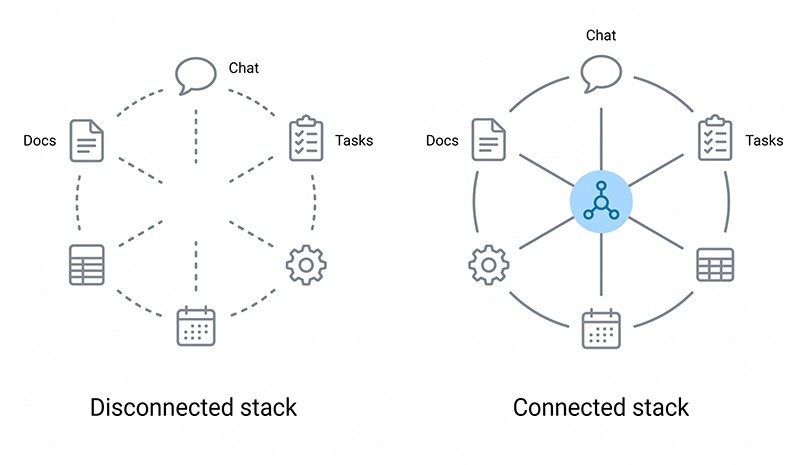
But most companies didn’t replace email. They added Slack on top of it. Then Asana. Then Notion. Then Loom. Then Linear. Then a wiki. Then a separate tool for OKRs. By 2023, Productiv’s State of SaaS research found that organizations were using an average of 371 SaaS applications — a 32% increase since 2021 — with more than half of those apps sitting outside IT’s control entirely.
The collaboration revolution didn’t reduce overhead. It multiplied it.
What Actually Changed in 2024–2026: The AI Layer
The most consequential shift of the past two years isn’t a new app. It’s that AI has become the layer linking everything else together.
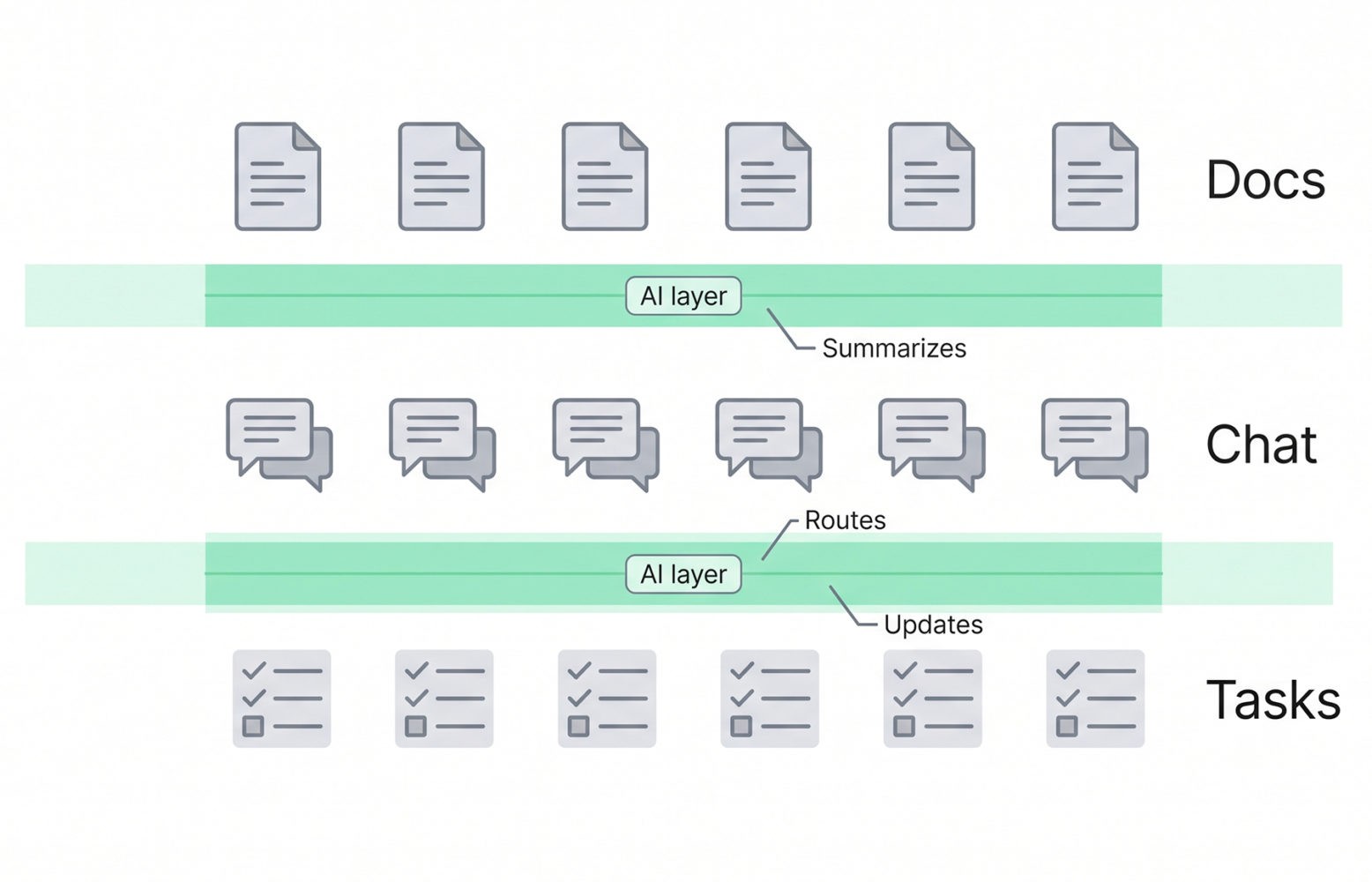
Three years ago, AI features in collaboration tools were mostly cosmetic: a summarization button here, a “rewrite this message” suggestion there. Today, they do real work. AI assistants in modern platforms can draft project briefs from a Slack thread, surface the one document buried in three different tools that answers a teammate’s question, generate a weekly status report by reading your actual activity, and flag projects that are going sideways before anyone notices.
This matters because it changes what a collaboration tool is. The old job was to hold information and let humans pass it around. The new job is to actively reduce the amount of coordination humans need to do at all.
Many teams I’ve worked with were running the same familiar combination a few years ago: Slack, Asana, Notion, Google Workspace, plus whatever analytics or reporting tool their product team had adopted along the way. What’s changed for several of them is a deliberate move toward consolidation — anchoring documentation and project tracking in a single primary workspace, keeping Slack for synchronous chat, and connecting both to an AI layer that could pull from either system. The teams that made that shift thoughtfully — cutting tools through considered decisions rather than just adding new ones — reported real results. From what I’ve seen, meeting time dropped by around a third within six months, and the volume of internal “where can I find X” Slack messages fell by more than half.
The takeaway wasn’t about any specific tool. It was about reducing the number of surfaces where work lives and connecting the ones that remain with an AI layer that actually understands both.
The Contrarian Angle: Your Productivity Problem Isn’t a Tool Problem
Here’s what most vendor marketing won’t tell you: the teams getting the most out of collaboration tools in 2026 are not the ones with the best stack. They’re the ones with the strictest rules about how to use what they have.
Asana’s 2023 Anatomy of Work Global Index, which surveyed more than 9,000 knowledge workers across six countries, found that workers spend 58% of their day on “work about work” — meetings about projects, status updates, searching for information — and only 42% on the skilled work they were hired for. The tools were supposed to fix this. They didn’t, because the underlying behavior didn’t change.
I’ve watched companies migrate from Slack to Teams expecting transformation, only to recreate the exact same chaos with different colors. The platform isn’t the problem. The expectation that every message deserves an immediate response is the problem. The 14-person channel where nobody knows who’s actually responsible is the problem. The five tools that all sort of track tasks is the problem.
This is why the most interesting trend of 2026 isn’t a tool — it’s a movement toward what some are calling “deliberate collaboration”: defined response windows, fewer recurring meetings, clear ownership, and AI-generated summaries replacing live status updates.
Beyond the Usual Suspects: Tools Worth Actually Considering
Everyone writes about Slack, Teams, Asana, Notion, ClickUp, and Trello. They’re well known for good reason — they work, and they have massive ecosystems. But if you only read those names, you’re missing where the genuinely interesting innovation is happening.
Linear has become the default for software teams who got tired of Jira’s complexity but found Trello too lightweight. Its appeal is almost philosophical: opinionated defaults, beautiful keyboard-driven UX, and an explicit focus on speed. Teams that switch rarely go back. If your work involves shipping software and you haven’t tried it, you’re operating with a handicap.
Autonomous AI agents inside project tools are the category to watch. Asana’s AI Studio and ClickUp Brain both ship features that go beyond summarization — triaging incoming tasks, drafting status updates, identifying blockers, and answering questions in threads. They’re still maturing, and neither has fully delivered on the promise, but this is clearly where the category is heading. Worth piloting if you’re already on either platform.
Coda sits in interesting territory between Notion and a spreadsheet. For teams that need real logic — formulas, automations, cross-document references — it often outperforms Notion’s looser document model. Operations and finance teams in particular tend to prefer it.
Tactiq is quietly reshaping meetings. It transcribes whatever video tool you already use and turns conversations into searchable, AI-summarized records with action items. It asks a useful question: what if the meeting itself produced documentation as a byproduct, without you switching tools to make it happen?
Loom continues to be underrated. Async video walkthroughs eliminate enormous numbers of “quick syncs” that didn’t need to exist. For distributed teams, it’s often the single highest-leverage tool to adopt.
Twist, from the makers of Todoist, deserves more attention than it gets. It’s designed explicitly as an antidote to Slack — thread-first, low-urgency, structured around the idea that not everything needs to happen right now. For teams drowning in real-time chat, it’s a meaningful alternative.
ClickUp belongs in this conversation despite being mainstream, because it’s increasingly the platform companies pick when they want to consolidate. Its “do everything” approach used to feel scattered. The 2025 redesign made it genuinely viable as a single-platform stack for small and mid-sized teams — though its AI features, while improving, are still catching up to the ambition of the platform overall.
Basecamp, somehow still going strong, remains the right answer for organizations that want calm software with strong opinions and no AI hype. Its philosophy of long-form messages over chat, scheduled check-ins over status meetings, and clear project boundaries holds up remarkably well.
Miro and FigJam continue to lead visual collaboration, but worth knowing: FigJam has been closing the gap fast for teams already living in Figma, and it’s often a cleaner choice if your work skews toward product design.
How to Choose: A Practical Framework
That list is far from exhaustive, and frankly, the specific names matter less than the criteria you use to evaluate them. If you’re considering a change right now, skip the feature comparison spreadsheets. They lie. Every modern platform claims to do everything. Instead, ask these four questions:
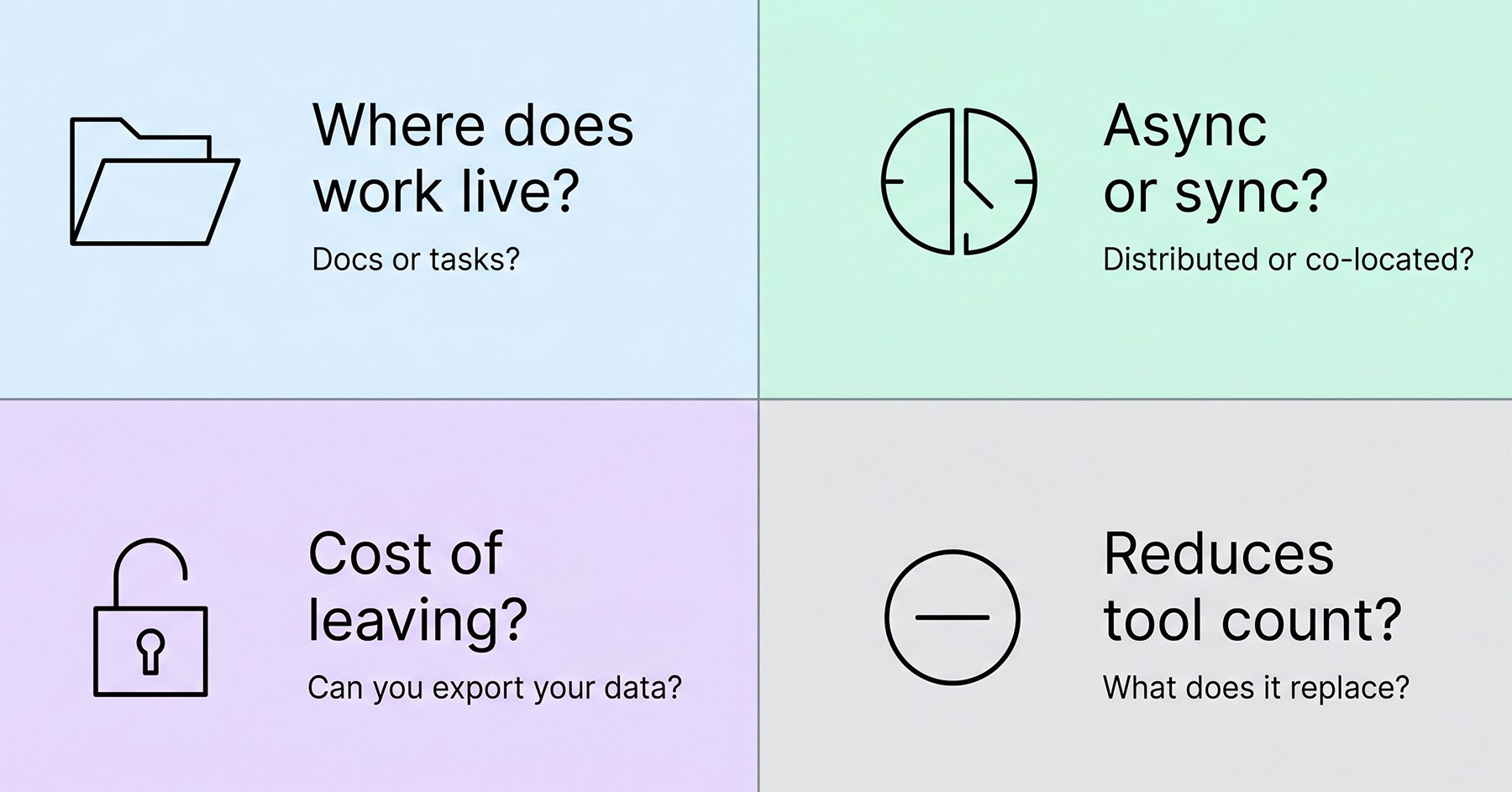
Where does the work actually live?
If most of your team’s real output is documents and shared knowledge, anchor on a docs platform (Notion, Coda, Confluence) and add chat. If it’s shipping discrete tasks, anchor on a project tool (Linear, Asana, ClickUp) and add docs. Don’t try to make a chat tool the center of gravity. Conversations are ephemeral; work isn’t.
What’s your async-to-sync ratio?
Globally distributed teams need async-first tools and async-first norms. Co-located or single-timezone teams can get away with chat-heavy cultures. Pretending you have one when you have the other is a recipe for resentment.
What’s the integration cost of leaving?
Ask this before you adopt anything. Tools that lock data into proprietary formats become expensive to leave. Tools with good export, API access, and open formats are worth a premium. The collaboration graveyard is full of well-funded products that shut down with months of notice — Height, Around, and others. Owning your data matters.
Will it actually reduce your tool count?
This is the only acquisition test that matters in 2026. If a new tool doesn’t replace at least one existing one, you’re adding overhead, not removing it.
Actionable Tips You Can Apply This Week
Forget the tool selection for a moment. Here’s what you can do regardless of your stack:
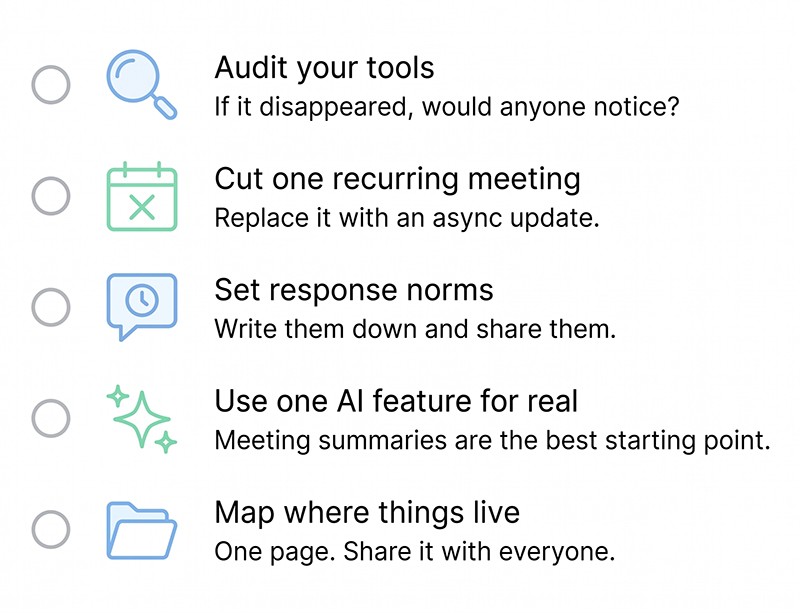
1. Audit your tools honestly
Pull up your last invoice and write down what you’re paying for. Then ask, for each one, “if this disappeared tomorrow, what would actually break?” Most teams find at least two tools they could cut without anyone noticing.
2. Kill at least one recurring meeting this week
Replace it with a written async update in whatever tool you already have. Measure how much pushback you actually get. Usually less than you’d expect.
3. Establish a response-time norm and write it down
“We respond to chat within four hours during work hours, and email within one business day.” That single sentence, agreed and visible, eliminates more anxiety than any tool feature.
4. Put one AI feature to real work
Not as a novelty — as a permanent part of your workflow. The highest-leverage one for most teams: AI meeting summaries with auto-generated action items. Pick a tool that does this well (Otter, Tactiq, Fireflies, or whatever’s built into your existing platform) and use it for every meeting for a month.
5. Create a single source of truth for ”where things live.”
A one-page document that says: project plans live here, customer feedback lives here, meeting notes live here, internal announcements live here. The number of teams that don’t have this is staggering, and the number of hours they waste because of it is worse.
What’s Coming Next and What It Means For You
Three shifts are already visible, and each one has an immediate implication for how you should be evaluating tools today. AI agents will move from summarizing to acting — drafting responses, updating projects, scheduling follow-ups — which means the tool you pick this year should have a strong AI roadmap, not just an AI checkbox. Voice is becoming a real collaboration interface, ambient and on-demand rather than meeting-bound, which means mobile experience and transcription quality matter more than they used to. And cross-tool intelligence — AI that sees across Slack, your docs, your calendar, and your CRM at the same time — is the category to watch most closely, which means the tool evaluation you do this quarter should weigh API openness heavily, because closed platforms won’t plug into whatever wins that race.
The Real Conclusion
The point of all this technology was supposed to be that work got easier. For many teams, it hasn’t. Not because the tools are bad — most of them are genuinely impressive — but because we kept adding without subtracting.
The teams that will look back on 2026 as a turning point are the ones who got disciplined. They consolidated. They wrote down their norms. They used AI to eliminate work rather than to do more of it. They stopped treating new software as a substitute for clear thinking about how their team should actually operate.
Pick fewer tools. Use them harder. Make the rules explicit. Let AI handle the coordination overhead. And every six months, look honestly at your stack and cut something that no longer earns its place.
The companies that figure this out won’t have the flashiest setups. They’ll just have teams that finally get to do the work they were hired for.
⸻ Author Bio ⸻
Ann Wisniewska is a project management professional with a strong background in collaboration and cross-functional coordination. She focuses on aligning teams, optimizing workflows, and ensuring efficient delivery of complex initiatives. Her experience spans managing distributed teams and fostering productive partnerships that drive projects from concept to completion.